How to generate passive income via online business or social media? Here is a free webinar to show you step by step. Click below. https://t.co/Wv6Yn6wxZ3 #socialmediamarketing #passiveincome #onlinebusiness #entrepreneur #startup #AdviceforNewTwitterUsers #Fridaythoughts
— Angelina Cheng Matthews (@HighFlyrr) 5 July 2018
Showing posts with label social media. Show all posts
Showing posts with label social media. Show all posts
Thursday, 5 July 2018
Step to Step Guide to Launch an Online Business and Generate Passive Income Via Social Media

Wednesday, 2 May 2018
Tuesday, 20 March 2018
Want to Win at Social Media? Here's What Followers Want, According to Experts at SXSW
Written by Amanda Zantal-Wiener
People have a lot of feelings about social media.
Love it. Hate it. Use it for business. Build a brand on it. Quit it. Come back to it.
With so many mixed messages, how are marketers supposed to stay on top of the right way to use social media -- and moreover, what users actually want from it?
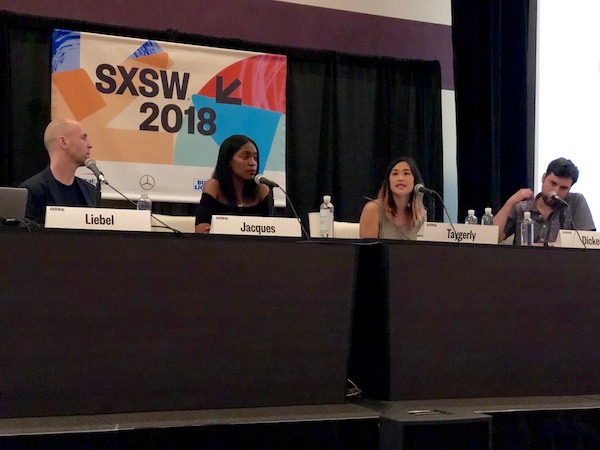
To answer that question, a panel of social media experts -- Teen Vogue's Rajni Lucienne Jacques, Facebook's Tutti Taygerly, and Instagram's Joshua Dickens -- shared their insights on what followers want the most in today's climate, in a discussion moderated by Work & Co's Gene Liebel.
What Followers Want
1. Communities
Think back, if you can, to a time when the folks who managed a brand's Facebook page were known as "community managers." That's because we once lived in an era when, not even that long ago, that was the purpose of pages like these.
And while there are still Groups available on Facebook -- smaller, often private destinations designed for communication among smaller groups of people -- it can be argued that they've lost a bit of their luster and are not the first destination for brands looking to build audience engagement.
But within the current global climate, the panelists appeared to agree that users are drifting back toward the idea of using social media to build a community: to give voices to a cause, to connect with others who care about the same issues they do, and to create a movement around it.
In fact, said Jacques, "Social media is the one thing that galvanizes a movement. [It] allows people to gather in a way that is faster and more efficient."
And while galvanizing a movement might not exist within the strategic models of goals for a small-to-midsize, business-to-business organization, there are still ways to leverage your social media presence to build on the idea of a community.
Take, for example, something that was said by WP Engine CEO Heather Brunner at an earlier SXSW panel: Businesses need to ask themselves, "What’s right for your employees? What’s right for your customers?"
Once those questions are answered, marketers can determine the issues around which the brands they represent can build communities.
If nothing else, brands can provide a venue for connection, which Taygerly said she believes social media users still want.
"As a company, we’re not just trying to promote passive consumption of content," she explained. "We’re trying to pay a lot of attention to that."
That actually aligns with certain ranking factors resulting from the changes Facebook made to its algorithm earlier this year. While people's News Feeds display less branded content overall, it does prioritize Page posts with more authentic engagement within the comments section (as opposed to such "share-bait" copy as "Tag a friend").
It makes sense, then, that Taygerly says Facebook is trying to discourage the passive consumption of content on its network, by rewarding the kind that stirs and signals the direction of community-building activity and discussion.
At the root of potential success for marketers in this area, the panelists said, is solving problems for the people and humans in the audience first.
"Anchor on the core people problem, and then figure out, 'What is the work?'" Taygerly advised. "What are the use cases?"
Solving for people, Dickens said, is likely to become a new success metric among marketers -- and one that's already used at Instagram.
"We’ve never solely measured time spent [on the network] as a metric of success," he said. "Metrics are, 'How close are we to solving a problem for a particular person?'"
2. Privacy. (Seriously.)
At one point in the discussion, Liebel asked, "Is anything private anymore?"
And while the response was mixed, the consensus did seem to indicate that users -- even those trying to build a brand or share a story on social media -- do care about privacy.
For her part, Jacques said that question could be answered with both "yes and no."
"It depends on what you choose to show. You have your Insta … and you have your Finsta , which is your fake Instagram," she explained, suggesting that some users create different social media accounts -- or personalities, in some sense -- to share different moments in their lives.
"In a way, you are private, depending on how you use [it]," she said.
That raises the question, Taygerly said, of when social media can add positivity to a user's life, and when it "becomes too much."
To illustrate that, she pointed to the ongoing challenge that Snapchat has experienced to the nature and degree of publicity user content should be.
"What should be shared just with friends and family, and what should be public?"
And what, she continued, "is the demarcation between those two worlds?”
In terms of how marketers can solve for that challenge, one of the best things they can do is respect their audiences' need for privacy, and provide a way for them to engage with both the brand and others in the audience in a way that makes them the most comfortable.
And while it might seem redundant, that does go back to the idea of building a community for your followers, regardless of your industry. But it also involves a cultural element, and understanding what protocols can be put in place to provide the privacy that different members of your audience need in that context.
"We do research all over the world and in different cultures than North America, showing your face as a woman invites some negativity, to put it mildly," Taygerly explained. "So having a mask [like different filters available on Instagram and Snapchat] and the ability to control the circle that you show your face to … helps you share your message."
It also involves understanding when your users need to leave -- or "detox" from social media, said Jacques.
"Social media [sometimes] becomes too much," she said. "You’re not liking yourself because of this, or that. So users take a detox and live their lives."
But that, Jacques explained, can actually make for better engagement, if marketers view this phenomenon in the long-tail. "To restart and reboot, you get better content," she said. "It’s nice for anyone who devours social media to go through to realize your best self.”
3. A Place to Share Their Stories
To that end, marketers should also maintain an awareness of a core reason for using social media: to connect with others, by way of sharing something.
“People are sharing their creativity and expanding it to their audiences,” Dickens said. And the job of marketers, it seems, is to remind their audiences that social media is a place where they can do that -- and encourage them to do so.
And while I'll once again caution against the use of doing so in a click-bait manner -- "share your photo and tag a friend in the comments" -- it is possible for marketers to prompt a conversation and provide a platform for users to story-tell in a thoughtful way.
That could start by a brand sharing its own story, and asking if anyone else wants to share theirs: a way of letting your audience know that it's heard.
Social media, explained Jacques, "gives a voice to those who never thought they had a voice."
"So we don’t tap into that?" she asked. "Why don’t we say, 'We’re inviting you in to tell your stories that you’re already telling your peers'?"
4. Smaller Networks
That said, there are likely users who are uncomfortable with the idea of amplifying their voices in such a public venue, like a branded Facebook Page that can be viewed by nearly everyone -- which introduces the need for what Taygerly calls "smaller, more intimate networks."
Keep in mind that the challenge for many Page administrators and creators, in light of Facebook's refined News Feed, is to create the content that stirs the type of authentic engagement algorithm is said to favor. That's "the hope" behind it, Taygerly said -- that it “triggers a conversation."
But she also pointed out that "sometimes, it’s easier to share more intimately in a group." And the answer to that, she said, may lie in "smaller, more intimate social networks."
To illustrate that idea, she raised the example of HQ Trivia: an app that hosts a live trivia game show that awards cash prizes to winners. And while arguably addicting, it's also "something that’s happening real-time with a group of people,” she said.
So, how can marketers create such an experience? To answer that, I'll float the same statistic that Facebook itself used when it first announcedthe changes to its algorithm in January: live videos receive 6X the engagement as non-live ones.
And what's another word for "live"? Real-time.
Aha!
There's a correlation, it would appear, between providing an audience to experience and comment on a live, real-time event as a community -- and rates of engagement.
But that could very well go beyond live video, and while marketers can work with that statistic and create such content, they should also think about the ways it can create these small, intimate venues for followers to experience something in which they share an interest or passion, and in a way that allows them to discuss it as it takes place.
That goes back to one of the first philosophies mentioned in this post: to home in on a core issue shared by your audience, and figuring out how to allow it to connect and engage around it.
"You can look at what’s happening in the world, [and] what ends up happening is we build a sense of community," Jacques said. "[We] want to do things, and make a difference in the world, in a full-throttle group.”
Do the panelists have a positive outlook on how that will ultimately play out?
"Yes, we’re optimistic," Taygerly said. "We’re designers because we envision a better world.”
I'll be at SXSW all week. What are the topics and events here that interest you the most? Feel free to weigh in on Twitter.
Tuesday, 13 March 2018
15 Powerful Facebook Marketing Tips (That Actually Work)
Facebook has had its ups and downs when it comes to marketing.
It was the first social media platform to launch ads, and it has since become a benchmark for how other social sites run their ad algorithms.
Of course, it hasn’t been without its controversies.
The founder of Facebook, Mark Zuckerberg, recently announced plans to reduce the impact of ads on user news feeds.
It’s a move that many see as a hit to advertisers and marketers alike.
But don’t worry quite yet. Even with algorithm changes, Facebook is still a powerhouse for growing your social reach.
Here’s why.
Why Facebook is still a powerful marketing tool
If you compare it to every other social platform out there, Facebook is still the biggest.
It now has over 2 billion monthly active users and over 1 billion daily active users. And they grew to this size within the span of 13 years.

Let’s put these figures into context. According to TechCrunch, no other platform has reached this many monthly active users:
- YouTube has 1.5 billion monthly active users.
- WeChat has 889 million monthly active users.
- Instagram has 700 million monthly active users.
- Twitter has 328 million monthly active users.
- Snapchat has an estimated 255 million monthly active users.
Though YouTube and Instagram are putting in the effort, Facebook remains on top.
And 93% of marketers admit to using Facebook advertising regularly. That represents roughly 3 million businesses that use Facebook strictly for marketing purposes.
But despite Facebook’s widespread use, marketers are worried about the recent algorithm changes.
According to Recode, some marketers have been reporting ad impression decreases and cost increases since January of 2018.

That might leave some skeptical about the future of Facebook for advertising.
While it’s unlikely that Facebook will abandon their advertisers altogether (they still earned $7.68 billion in ad sales in Q1 of 2017), it’s possible that new changes might affect paid ads at some point.
But even if paid ads go the way of the dodo, there are still plenty of ways you can use Facebook to market your business.
Here are 15 Facebook marketing strategies that will grow your business. And yes, they actually work.
1. Choose the right category for your business page
First thing’s first: You need a business page and not a personal profile.
But I’m going to assume you already know that. If not, here’s how to set one up.

I’ll go into more detail about why my page looks the way it does in the remaining tips.
But for now, take note of a few key features, including:
- My profile picture
- The “Sign Up” CTA
- My sidebar tabs

These elements will all become important later on.
Before I get to all of that, however, I want to mention something important about the setup process.
You’re going to want to create your profile under a specific category. Facebook has six options:

For the majority of people reading this, you will probably fall under the Local Business or Brand categories.
The category type matters because each category has different features.
Local businesses, for example, will have a section for a physical location listing, while an online brand will not. This will be important if you’re looking to raise brand awareness.
If you need help choosing the right type, here’s a breakdown of the different categories.
2. Get a vanity URL
There are many ways that you can optimize your page once you’ve set it up, but the first thing you’ll want to do is grab a vanity URL.

This will give you an easy-to-read page link that you can post in other places (see #14).
I just use my name for my vanity URL because it’s also my brand name:

When marketing is your goal, the reason I recommend using a vanity URL is that it’s good for SEO.
Your profile page is not only more searchable on Facebook when you use a vanity URL, but it’s also more searchable on Google.
Google will link it to your site’s keywords.
Besides that, it just looks more professional, which never hurts.
2. Optimize your photos
The next thing you want to do is get some high-quality photos up on your profile.
Facebook (and almost every social site) is highly visual.
I use my headshot. But if you’re a brand, you will most likely use your logo for your profile image.
You also want to choose the right cover photo.
I like what Quick Sprout does. They have a clear logo for their profile picture, and they include a CTA image as their cover photo:

This gives them two CTAs to work with (the banner and the “Learn More” button).
Your cover photo doesn’t have to be a CTA, though. You can also use it show off your creative side.
Here’s an example from Makr that showcases their brand aesthetic and personality while also explaining what they do:

Use your photos as an opportunity to showcase your brand to your audience.
Tell them what you do. Tell them who you are. Have fun with it.
That’s honestly what marketing is all about anyway.
3. Choose your CTA button
There’s a little CTA button on every Facebook business page.
What it says will be up to you, so you have some options to play around with.
If you remember, mine says, “Sign Up.”

I use almost all of the CTAs on my website to grow my email list, so that’s why I chose that particular CTA on my Facebook page.
You can choose from a list of options, including:
- Book Now
- Contact Us
- Use App
- Play Game
- Shop Now
- Sign Up
- Watch Video
You can link these to any number of things like a landing page on your website, a contact form, a video, or an opt-in page.
It all depends on your ultimate conversion goals.
Dollar Shave Club has a CTA that says “Sign Up” even though they’re selling a product because they’re a subscription service.

Their CTA leads to an introductory offer for their service.

This goes to show that there are no hard-and-fast rules for your CTA.
Just focus on what you think your Facebook visitors will be most likely to click.
4. Use custom Facebook tabs
Do you remember the little sidebar tabs on my profile that I mentioned?
They’re customizable.
This is important for a few reasons:
- You can include any and all pertinent information about your brand.
- You can use it as another way to include a CTA.
- It helps answer questions that users might have before they “buy in.”
Take a look at this example from Moz’s Facebook page:

They have separate tabs that include information about them, videos, posts, and a community page, which tell you even more about the company.
Their community page is actually pretty active.

But they also have an additional CTA in their tabs for a free trial offer.

This is in addition to the “Sign Up” CTA on the right-hand side just below the banner that invites the visitor to attend the conference.
In other words, there are multiple ways for users to interact with this page.
There are multiple ways for Facebook users to find their way back to Moz’s site.
It’s a good lesson for all marketers out there who want to increase engagement with their Facebook profiles and drive more traffic.
Create more than one CTA.
5. Follow the “70-20-10” rule
Once you’ve optimized your profile for engagement, it’s time to create content.
You don’t want to stick to just one type of content. This is your chance to test out different formats that your audience will love.
Start with some link-based or visual content like a business update:

Consider which types of posts will get the most engagement.
If you’re having trouble finding a balance of content to post to your Facebook page, follow the 70-20-10 rule:
- Post original content 70% of the time.
- Post content relevant to your followers’ interests 20% of the time.
- Post self-promotional content 10% of the time.
Keep it varied.
You might mix it up with questions, callouts, or observations about your industry.
Here’s an example from Target that practically begs for user interaction (in a good way):

A good Facebook post strategy will include more than just blog post links.
If you want engagement, ask for it. Pose a question. Offer up a poll.
6. Clean up your posts
The Facebook news feed can be a crowded space.
The way you format your posts will either make them stand out or fade away into the background.
A social media post accompanied by a high-quality photo is ten times more likely to get engagement than a post that only has plain text.

Keep your images sharp and easy to read (if there’s text).
If you’re sharing a link, you’ll also want to remove the link URL from your post copy.

This will keep your post from looking cluttered. Plus, it will put the focus back where it belongs: on the image and the headline.
If you want to include a separate link other than the one that Facebook populates for you, then you can use a URL shortener like Bitly.
Your posts will look clean and readable, which also makes them shareable.
7. Share user-generated content
You can also share user-generated content instead of having to come up with your own.
This not only saves you time and energy, but it can also promote brand loyalty and help users feel included.
One of the easiest ways to do this is by having users share photos of interactions with your brand or product.
Buffer, for example, features photo albums from their followers from different meetups:

Whether you ask users to share photos with you or repost from their own pages, it’s a great way to improve engagement.
You can also share posts on your community page when a user mentions you.
Here’s an example from Evernote:

This can help your followers feel included and recognized.
Everybody wants to feel known on social media, and they especially want their favorite brands to know them.
Allowing users to be a part of your page in a personal way can help improve the bond with your brand.
8. Post videos (especially live videos)
Another big way to boost engagement is with video content.
Facebook users watch over 100 million hours of video every day.
And the popularity of videos appears only to be growing. Between April and November of 2015, the number of video views per day doubled from 4 billion to 8 billion.
Facebook is also making changes to how their algorithm measures people’s interest with videos.
This means that videos will most likely appear first in some of your followers’ feeds.

If you’re going to invest in any one type of content this year, invest in video.
There are some important things to remember when you’re creating videos for Facebook, though.
First, 85% of Facebook users will end up watching videos with the sound off. This means that captioning your videos will be essential to engagement.
Captioned video ads can increase video view time by an average of 12%.
Second, 80% of users are annoyed when videos auto-play sound, so be sure that you’re setting up your videos correctly when you post.
If you’re not into producing video, take advantage of Facebook Live. It’s the live video streaming service that lets anyone broadcast videos from a mobile device.

While it’s still a relatively new addition (Facebook launched it in 2015), Facebook Live has seen some good results in terms of marketing engagement.
9. Use Facebook Page Insights to analyze content
Posting quality content is only part of the battle.
Another part is monitoring your metrics to find trends in engagement so that you know what content is succeeding.
The best tool for this job is Facebook’s internal analytics tool, Facebook Page Insights.

This will provide you with a snapshot of the last seven days of your page’s performance, including:
- Page likes — Measures the total and new likes for your page
- Post reach — Measures the total number of unique views on your page and posts
- Engagement — Measures the total number of unique people who engaged with your page and posts
You’ll also be able to access information about your page’s reach, including likes, comments, and shares.

You can access your page’s Insights here. Or, you can click into the ‘Admin Panel’ on your page.
10. Test your timing (based on Facebook Insights)
Another thing you want to do is play around with the timing of your posts.
You can get that information from your Page Insights data.
It will show you when your followers are online, what types of posts do better during different times of the day, and which posts are the most engaging.

This will give you insight into the optimal time to post for your Facebook followers.
If you want, you can conduct experiments to test out the best timing of your posts and track your metrics to see if your theories are right.
You might try to post different content (casual humor posts, etc.) at non-peak hours to see how it affects your engagement, too.
By monitoring your post timing, you’ll have a leg up on engagement for your page.
11. Use Audience Insights to analyze user behavior
Another analytics tool you’ll want to use is Facebook Audience Insights.
This is a little different than Page Insights in that it gives you information about your core audiences rather than pure engagement metrics. (HubSpot has a step-by-step guide to Audience Insights.)

You get demographics overviews like age and gender breakdowns, education levels, and job descriptions.
Or you might find valuable information about your followers’ hobbies and interests.
This can be extremely helpful when you’re determining what type of content to produce or what topics would most interest your audience.
It will also help you narrow down your Facebook Ads (see #13).
12. Promote your page with Facebook Ads
Organic posts aren’t the only way to engage users.
I know that Facebook’s algorithm changes might have you wary of using Facebook Ads.
Yes, the CPM increased in Q4 of 2017.

Yes, the average Google AdWords CPM decreased in Q4 of 2017.

But when you’re looking at the numbers, Facebook is still way cheaper than Google AdWords (12.75 vs. 78.47).
In terms of marketing value, Facebook Ads are still an inexpensive and effective marketing method.
When you combine paid ads with a solid organic posting strategy, they’ll still work.

If you’re new to the Facebook Ad process, be sure to brush up on how to set up ads for maximum conversions.
And don’t be afraid of the algorithm changes.
When you target the right audiences, your ads should still appear where and when you want them to.
13. Target specific audiences to boost ad reach
If you really want to ensure that your Facebook Ads are effective, learn how to narrow your audience.
According to WordStream, there are at least 11 specific audiences you can target.

These range from location-based audiences to segmentation based on hobbies and interests (remember your data from Facebook Audience Insights?) and even life events.
Are you a wedding photographer? Target users who just got engaged in your area.

There are hundreds or even thousands of ways you can tailor your ads to improve reach.
The key is to take the time to analyze your customer base and form buyer personas.
When you have an idea of what your audience already wants, your ads will perform better over time.
14. Promote your page outside of Facebook
If you want to improve engagement on your Facebook page, you need to find ways to bring traffic to it.
Yes, using promoted posts and paid ads can highlight your page to Facebook users who are browsing the platform.
But what about your users who don’t even know that you have a Facebook page?
Include a link to your Facebook page (and other social accounts) on your website.

Add it to the bottom of your emails.
Put it in your other marketing materials.
Make your blog posts shareable on Facebook.

Include links on your business cards. After all, the point of a vanity URL is shareability.
You can also go a step further and give your audience a reason to become a Facebook follower.
Offer them exclusive deals, content, or promotions that get them excited about following you.
This gives them major incentive to actually engage with your brand on Facebook.
15. Partner with influencers
If you’re still struggling with Facebook engagement, partner with someone who already has it all figured out.
Influencer marketing can really impact your engagement if you do it right.
The trick is to find influencers who are already in your space and who want to work with you.
Try using a tool like BuzzSumo to help you find them. With their influencers and outreach feature, you can search for influencers using keywords relevant to your industry or business.

Sadly, there’s no search feature that will help you find influencers directly on Facebook due to their advanced privacy settings.
But you can find influencers on other social sites like LinkedIn or Twitter and then search for them manually using Facebook’s search bar.
On LinkedIn, you can enter specific keywords within the search box to pull up second-degree connections and users who are directly related to your search.

Twitter’s analytics tools will help you identify trending topics and hashtags related to your brand, which might also point you in the right direction.
Once you find an influencer you want to reach out to, spend some time cultivating that relationship.
It’s a slow-burn marketing method, but it does work.
You might be surprised by how much engagement you can create simply by asking others to help you out.
Conclusion
Despite the recent changes to Facebook’s advertising and algorithm, it can be a great marketing tool for most businesses.
The key to success is to focus on a combination of organic reach and paid ads. At the same time, take advantage of influencer marketing.
Having a multifaceted approach will improve your engagement over time.
The most important things to remember about posting on Facebook is that you need to optimize.
Optimize your Facebook business page, optimize your photos, optimize your links, and optimize your videos. Optimize everything.
Don’t just post for the sake of posting.
Make sure that the content that you produce on Facebook actually matters, and you’ll see results.
What are your favorite Facebook marketing strategies?
Subscribe to:
Posts (Atom)